
Why we built Cilevi
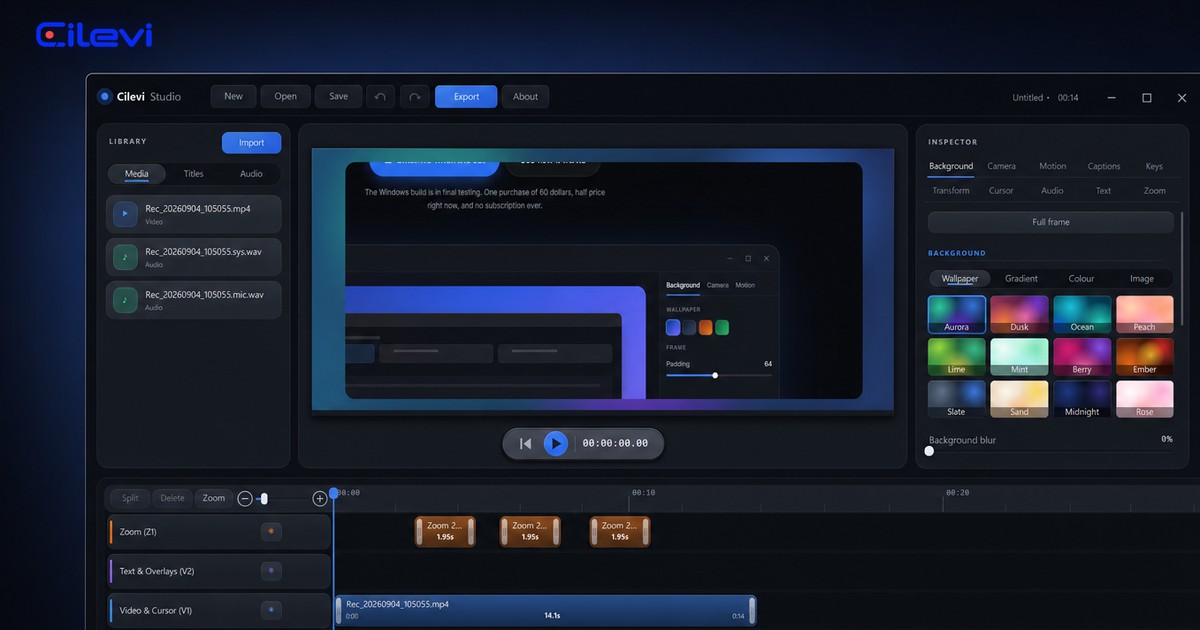
There is a category of screen recorder that does something ordinary recorders do not. You hit record, you click around a piece of software, you stop, and what comes back is not what you did. It is zoomed in where you clicked. The pointer glides instead of twitching. The window sits on a coloured background with a soft shadow under it. It looks like somebody edited it, and nobody did.
We wanted to make that kind of recording. On Windows, in 2026, that turned out to be harder than it should be, and the reason is the whole story.
The one everybody names does not run on Windows
Screen Studio is the tool that defined this category. It is genuinely good. It is also macOS only, and has been since it launched: there is no Windows build, and there is no Windows build on the roadmap either. If you ask, you are told it is not planned.
That is a reasonable decision for them and a strange one for the rest of us. The people who most often need a clean product walkthrough, the ones recording a desktop application, a spreadsheet, a piece of internal tooling, a CAD package, a trading terminal, a line-of-business app that has existed since 2004, are overwhelmingly on Windows. The tool that would make their recording watchable is the one tool they cannot install.
So the first answer to "why did you build this" is dull and true: because we wanted to use it and we could not.
The open one was 841 megabytes
There is an alternative that does run on Windows. OpenScreen has come a long way from the Electron app it started as: version 1.10.0 has a Rust compositor sitting on Direct3D 11, FFmpeg for encoding, whisper.cpp for captions, even a chat agent that can drive the timeline. Some of it is better than what we have. Its GPU export was, when we first measured it, several times faster than ours.
Then we measured what it costs to have it on your machine, on an i9-13900K with an RTX 3090 Ti, in September 2026:
- 244.5 MB to download the installer.
- 841 MB on disk once installed.
- About 600 MB of memory across six processes, sitting idle, doing nothing.
- 0.5 seconds from launching it to a window you can use.
Against that, the same measurements for the app we ended up writing:
- 0.9 MB executable.
- 23 MB of memory for the recorder sitting in the tray.
- 0.07 seconds to the toolbar.
That gap is not a benchmark you win a rosette for. It is the difference between a tool you leave running all day and a tool you close because your laptop fan came on. A screen recorder is the definition of an application that should be invisible until you press the button: it is the thing you use while doing the real work, on the same machine, at the same time, usually while the machine is already busy with whatever you are recording.
And a screen recorder that is not native has a second problem that shows up the moment you try to record something interesting. It has to ask the platform for the screen, the pointer, the keystrokes and the window list through however many layers of abstraction sit between it and Windows. Every one of those layers is a place where a feature quietly becomes impossible.
What was actually missing
We spent a while going through OpenScreen's own issue tracker, several hundred requests, to see what people were asking for and not getting. The pattern was consistent, and it was not about compositors.
No area capture. Not on any platform. You record a display or you record a window. If what you want is a rectangle around one panel of an application, you record the whole screen and crop it later, losing resolution to do it.
No keystroke overlay. This was the single most reacted-to request in the repository, and it had never shipped. It is also the thing that makes a software walkthrough comprehensible: if you press Ctrl+Shift+P, the viewer needs to see that you pressed Ctrl+Shift+P, because they cannot see your hands.
No live camera preview while recording. You find out whether you were in frame after you stop.
No click ripple, no export estimate, no copy-to-clipboard export. Small things, each one an extra step, every single time.
None of these are hard. They are just not what you build first when the interesting problem is a Rust compositor. But they are what you notice on the fourth take of a video you are recording at eleven at night because it has to go out tomorrow.
So we wrote the boring version
Cilevi is a screen recorder and an editor for Windows, in one 1 MB executable, written against the Windows APIs directly rather than through anything. That constraint was not minimalism for its own sake. It was the thing that made the missing features possible.
Because the recorder is talking to Windows without an interpreter in the middle, it can log the exact position, the exact click and the exact pointer shape on every sample, at the moment they happen. That single decision is what produces the two features people notice first:
The zoom writes itself. The recorder knows where you clicked. When the studio opens a take, it groups those clicks into bursts and turns each burst into a zoom clip on its own lane, easing in around the pointer and back out again. You did not place them. You can move them, retime them, delete them, or draw your own on the preview, but the default is a take that is already zoomed in the right places.
The pointer keeps the shape it really had. There are twelve pointer shapes in Windows that matter: the arrow, the I-beam over a text field, the hand over a link, four resize arrows, the move cross, the busy spinner, and so on. Cilevi records which one you were looking at, sample by sample, and redraws that silhouette smoothly in the finished video. Click into a text box and the recording shows an I-beam, because that is what was on your screen. A recorder that captures the pointer as a picture, or that draws one generic arrow for everything, cannot do this.
The rest followed from having the plumbing: twelve wallpapers and twelve gradients to put the recording on, padding and a corner radius and a directional shadow, a webcam inset on any of nine anchors, captions transcribed on your own machine and never uploaded, the keystroke overlay that had been asked for and never built, and a six lane timeline underneath all of it for when the automatic version is not what you wanted.
The export number, which we lost and then took back
For a while the honest comparison went badly for us. The same 60 second 1080p take exported in 9.8 seconds on OpenScreen's GPU path and 45.2 seconds on ours, which was doing its compositing on the CPU. That is a real defeat and we are not going to pretend otherwise.
So we wrote a Direct2D and Direct3D 11 renderer for the same compositor, kept the CPU path as a fallback for machines without a usable GPU, and made it a setting rather than a guess. The same take now exports in about 4 seconds.
We are telling you the before number as well as the after because a comparison you can only read in one direction is an advertisement. Ours was slower. We fixed it. If you find something else where we are behind, the feedback board is right there, and it is read.
What this is not
Cilevi does not have an LLM that edits your timeline for you. It does not have neural background removal. It does not run on macOS or Linux, and it is not going to: the entire reason it exists is that somebody had to take Windows seriously, and you cannot take one platform seriously by treating it as one of three build targets.
It also is not free forever. It is a one time purchase, no subscription, because a screen recorder is a tool and you should be able to buy a tool.
What it is: the recording you would have made if you had spent an hour editing, without the hour. On the operating system most people are actually using.
If that is the thing you have been looking for and not finding, tell us what to build next. Most of the list above started as somebody complaining.
Comments 0
Nobody has said anything yet.